Meetings & Scheduling
Book meetings inside the WhatsApp thread with tappable times, then send the calendar invite and the reminders in the same conversation.
Booking the Meeting Without Leaving the Chat
The problem today
When a prospect asks for a call on WhatsApp, the usual reply is a booking link. It opens a browser and a calendar grid at exactly the moment the person was ready to say yes, and the reminders that follow go to an inbox they do not read.
How Klaros solves it
The rep proposes up to three times as buttons in the thread. The prospect taps one and the call is booked, confirmed back in the chat with your video link and a one-tap calendar invite. Klaros warns the rep before offering a time that clashes with a call already booked, reminds the prospect a day before and again shortly before, and lets them confirm or reschedule with a tap.
See it working
A 38 s narrated walkthrough of Meetings & Scheduling, made from real product screens. Phone numbers are masked.
Read the transcript
Meetings. Booking without leaving the chat.
Offer three times as buttons. One tap books the call, right in the thread.
The confirmation carries your video link, and a calendar invite.
Reminders arrive a day before and again shortly before, and people confirm or reschedule with a tap.
Klaros runs in your own Cloudflare account. Start with a 14-day trial of the core CRM at tryklaros.com.
Customer Situations
A prospect asks for a call, and a booking link loses them.
The Problem
A prospect writes "Can we talk tomorrow afternoon?" The rep replies with a calendar link. The prospect opens it, gets pulled into something else, closes the tab and never books.
The Klaros Way
The rep sends three times as buttons. The prospect taps one, and the call is booked and confirmed in the same chat with the video link and a calendar invite.
Technical Differentiator: Offer-bound reply buttons, shown in the prospect's own time where that can be known for certain.
Expected Impact: The booking happens at the moment of intent, in the channel the prospect chose.
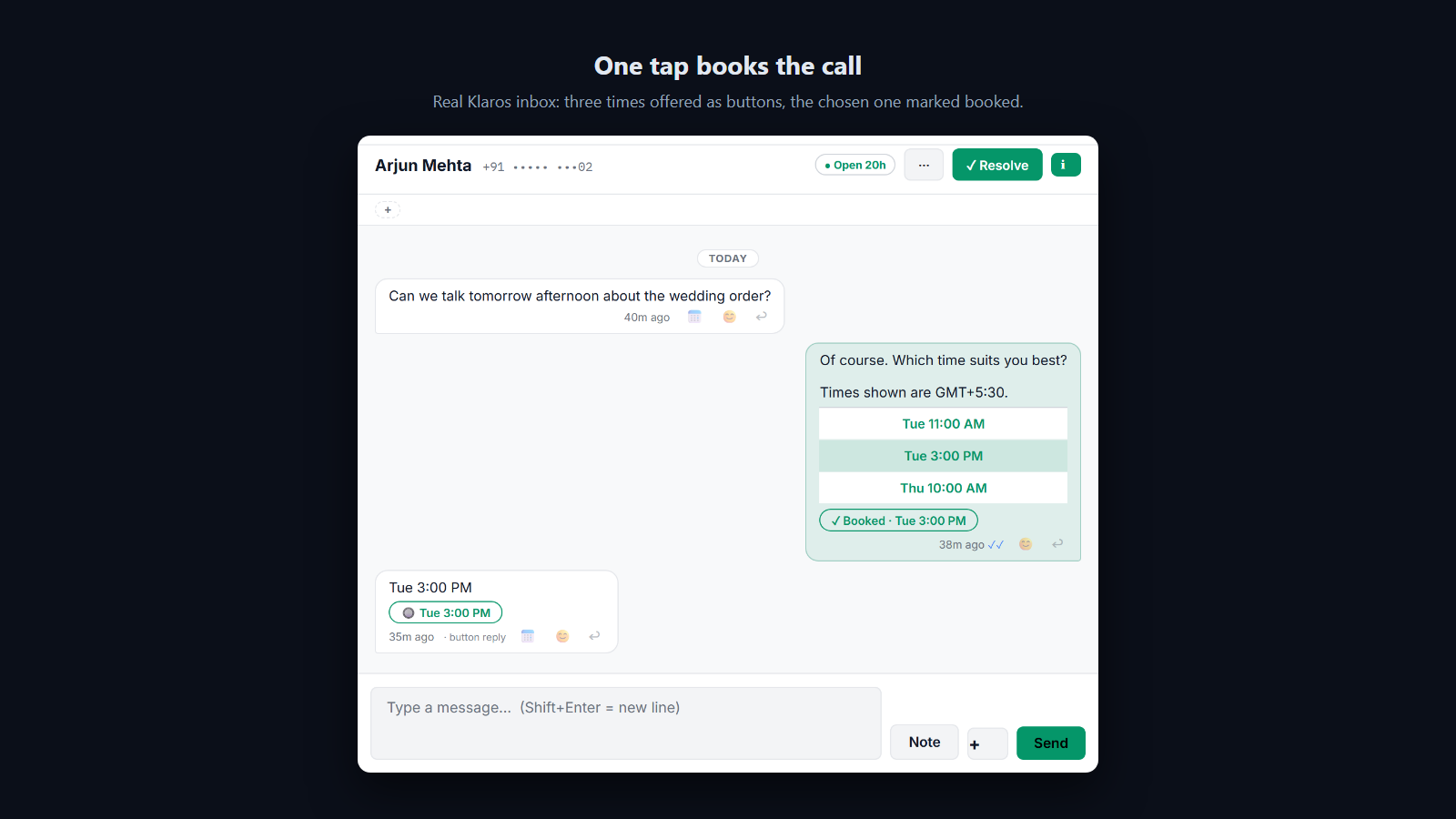
Times are offered as buttons in the chat, and one tap books the call.
Reps double-book and paste video links by hand.
The Problem
Reps type times into the chat, paste the Zoom link, and now and then offer a time they have already given someone else.
The Klaros Way
Klaros keeps an agenda of every call booked through it and warns the rep before a clashing time goes out. A default video link is saved once and goes into every confirmation and reminder, together with a one-tap calendar invite.
Technical Differentiator: A clash check against booked calls, a workspace default meeting link, and .ics invites that open in the phone's own calendar.
Expected Impact: Fewer clashes, no link pasting, and the call already in the prospect's calendar.
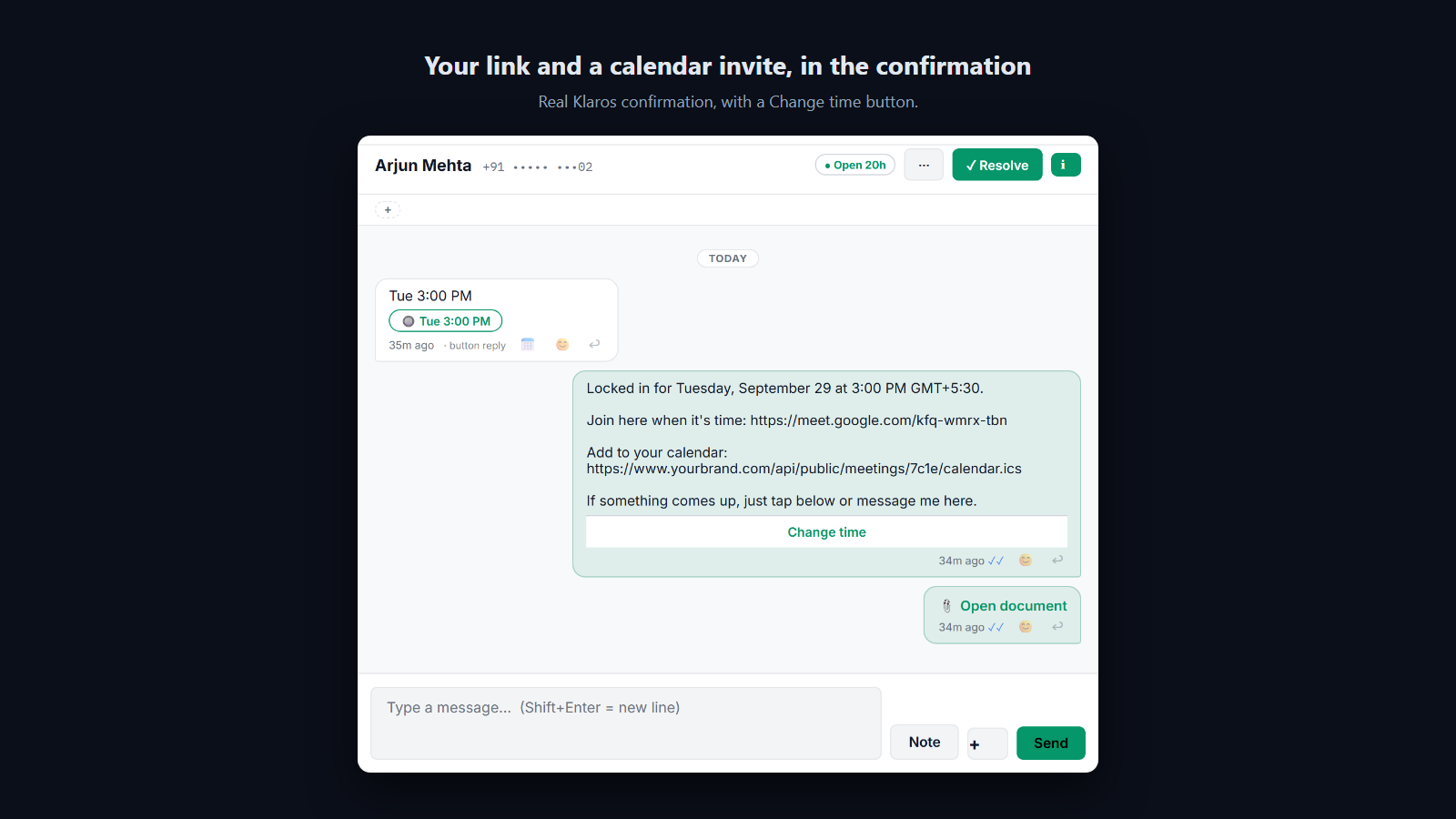
The confirmation carries your video link, a one-tap calendar invite and a Change time button.
Prospects forget booked calls.
The Problem
A prospect books a call for Thursday. By Thursday they have forgotten, and the reminder email sits unread.
The Klaros Way
A reminder goes a day before and again about 90 minutes before, in WhatsApp, with I'll be there and Reschedule buttons. A tap on Reschedule offers new times straight away.
Technical Differentiator: A two-stage reminder sweep that uses approved utility templates once the 24-hour window has closed.
Expected Impact: People are reminded where they actually read messages, and can move a call instead of silently missing it.
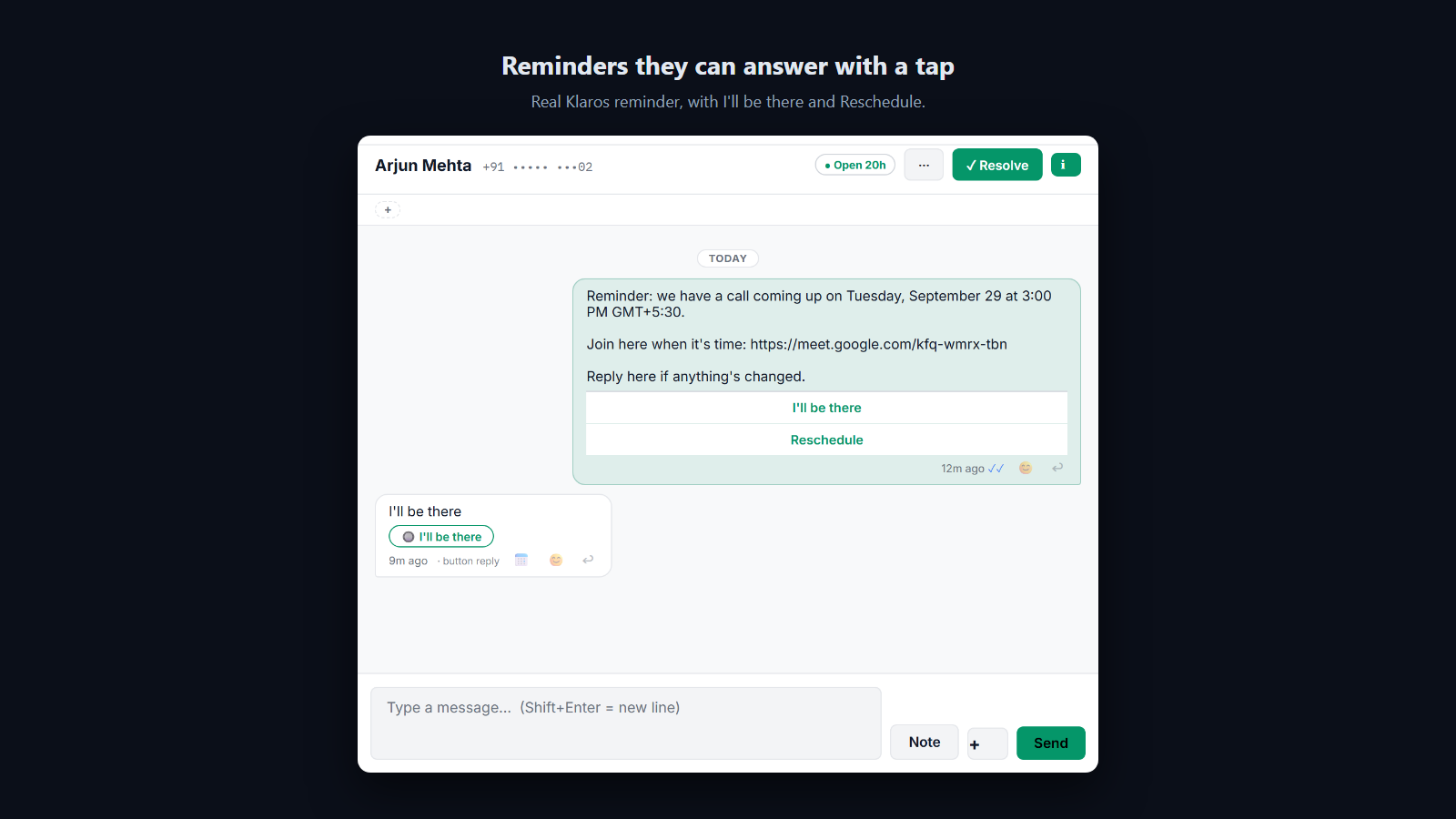
Reminders arrive a day and 90 minutes before, with one-tap confirm and reschedule.
How it works
- Propose: from the inbox, the rep offers up to three times as reply buttons, shown in the prospect's local time when their country has a single time zone, with a warning for very early or late slots.
- Check: before sending, Klaros warns if a time clashes with a call already booked in Klaros.
- Book: the prospect taps a time and it is booked and confirmed in the thread, with your video link and an add-to-calendar invite.
- Remind: a reminder goes about a day before and again about 90 minutes before, each with I'll be there and Reschedule buttons.
- Reschedule: a tap on Change time or Reschedule offers fresh times that avoid clashes, without anyone typing.
- Close the loop: after the call, the rep records whether it happened, was a no-show, or needs rebooking.
Boundaries and prerequisites
Requires
- A connected WhatsApp number. Bring your own Zoom, Google Meet or Teams link if you meet by video.
Works with
- Zoom
- Google Meet
- Microsoft Teams
- Any calendar app that opens an .ics invite
Does not replace
- Your team calendar. Klaros does not read or write Google or Outlook calendars.
When not to use it
- If bookings must follow live availability across a shared team calendar, which needs a calendar sync Klaros does not do.
Frequently Asked Questions
Does the customer need an app to join?
No new app. The booking happens in WhatsApp, and the call uses your own Zoom, Google Meet or Teams link, which opens the way that service normally does.
How does it handle time zones?
When the customer's phone number belongs to a country with a single time zone, times are shown in their local time with yours alongside. For countries with several zones, times are labelled with your zone, so nothing is guessed.
Does it sync with Google Calendar or Outlook?
No. Klaros does not read or write your team calendar. Each confirmation carries a one-tap calendar invite for the customer, and Klaros warns you before you offer a time that clashes with another call booked in Klaros.
What happens if a prospect needs to reschedule?
They tap Change time on the confirmation, or Reschedule on a reminder, and Klaros offers fresh times that avoid calls already booked, without anyone typing.
Do you take a markup on the WhatsApp infrastructure cost for this extension?
No. Klaros never sits in the payment or messaging path. You connect your own WhatsApp Business Account (WABA) and pay Meta directly. "Zero markup" is a structural guarantee.
Can I trial this extension before committing?
Every workspace starts with a 14-day free trial of the core CRM, and can see every extension and what it does. Switching an extension on is part of a paid plan: message us on WhatsApp and we will turn it on for you.
Where is my conversation data stored?
All data lives in your own isolated Cloudflare D1 database and R2 buckets. Klaros is self-deployed infrastructure, giving you total data sovereignty and zero vendor lock-in.