EventsHub
Run an event on WhatsApp from the first poster to the thank-you: registration, passes, reminders, a waiting list, a door scanner that works with no signal, and a count of who came from where.
Count Who Came, Not Who Clicked
The problem today
Most event tools stop at the registration form. They hand the organiser a list of sign-ups, and a sign-up is only a promise. Between it and the door there are weeks of silence, reminders someone has to remember to send, a spreadsheet at the entrance, and a thank-you that goes out late if it goes out at all. The number that says whether an event worked, who actually came and what brought them, is the one nobody has.
How Klaros solves it
EventsHub runs the whole event inside WhatsApp, where attendees already are. People register from a poster, a group or a link. The pass, the reminders, the waiting list and the thank-you go out on their own. Volunteers scan passes at the door on their own phones, with or without signal. Every result is counted at the door, not at the form: each poster, group and partner link shows how many it brought and how many of them came, and the public event page says how many were scanned in, never how many signed up.
See it working
A 1 min 1 s narrated walkthrough of EventsHub, made from real product screens. Phone numbers are masked.
Read the transcript
EventsHub. Events run on WhatsApp.
Every event shows the messages its attendees get, and when: the pass, two reminders and a thank-you, all sent on their own.
Read each message in the words attendees will see, and switch off the reminders you do not want for this event.
At the door, volunteers scan passes on their own phones, even with no signal, and arrivals appear as they happen.
Afterwards, each poster, group and link shows how many it brought, and how many of them came.
Speakers and sponsors get their own invite links, and every task has an owner who is reminded on WhatsApp.
Klaros runs in your own Cloudflare account. Start with a 14-day trial of the core CRM at tryklaros.com.
Customer Situations
Weeks of silence between a registration and the door.
The Problem
Someone registers three weeks ahead and hears nothing until the day. They forget, cannot find the venue, or cannot find the ticket in their email. The organiser meant to send reminders, and in the busiest week of the event, did not.
The Klaros Way
Each event shows the messages its attendees will get and when: the pass as they register, a reminder the day before and two hours before, and a thank-you afterwards. They go out on their own in the attendee's WhatsApp thread, and anyone who says they cannot come, or has already been scanned in, is not reminded again.
Technical Differentiator: Each message is owed to a named person and re-checked just before it goes, so a reminder never reaches someone who said no or is already inside.
Expected Impact: Every attendee hears from you at the moments that matter, and nobody has to remember to send it.
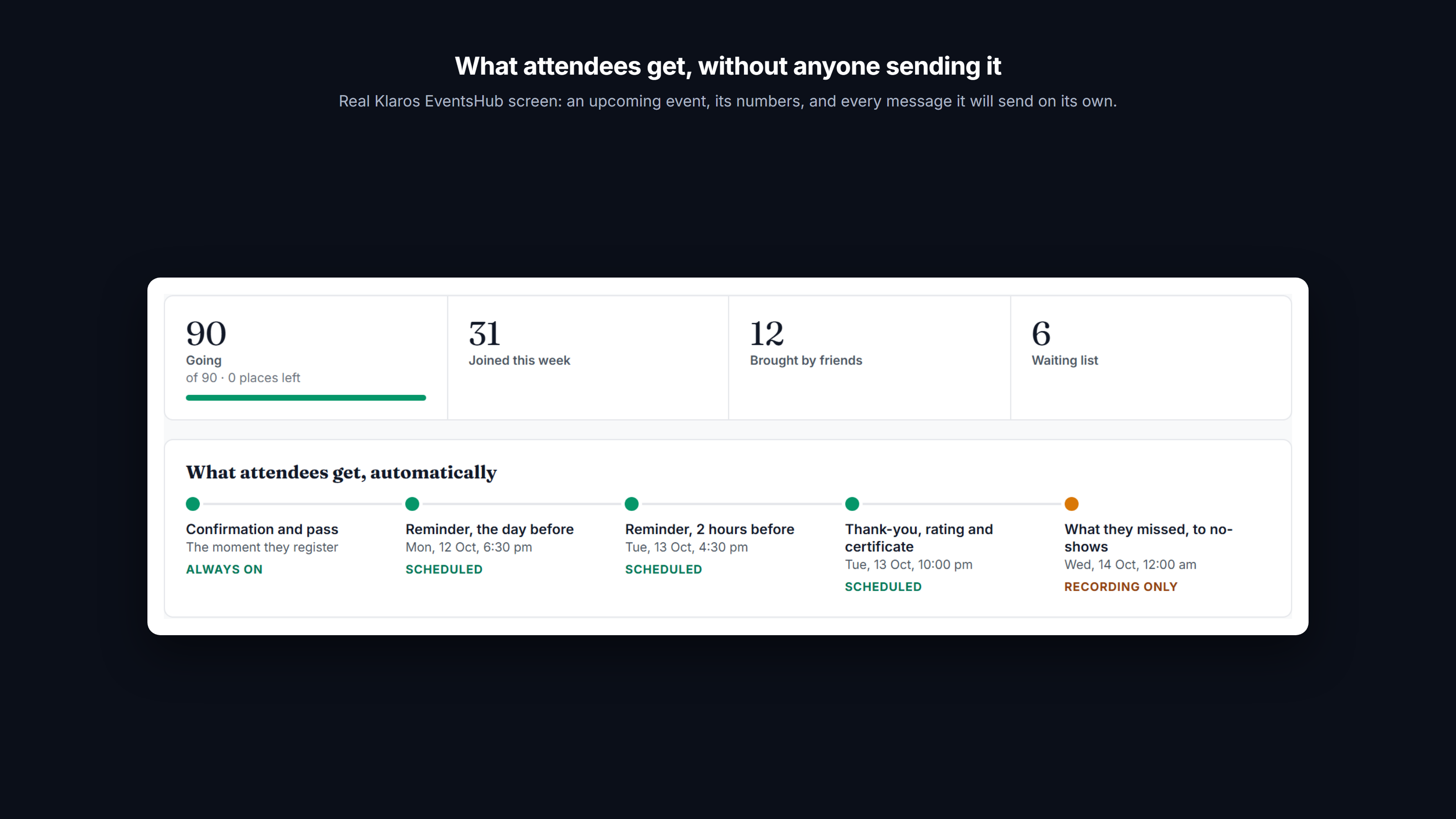
An upcoming event with its numbers, and every message it will send on its own with when each one goes.
Nobody knows which poster, group or partner filled the room.
The Problem
An organiser puts up posters, posts in three college groups and asks two partners to share the link. Registrations arrive, but afterwards nobody can say which of those efforts brought people, let alone which brought people who turned up.
The Klaros Way
Every way in carries its source into the registration: the poster's QR code, each group's link, each partner's link. After the event, each source shows how many it brought and how many of those were scanned in at the door, beside the rating attendees gave the event.
Technical Differentiator: The source travels in the attendee's own first WhatsApp message and is joined to the door's scans, so "came" is what the door recorded, not what the form collected.
Expected Impact: Put the next poster, and the next favour you ask of a partner, where people actually came from.
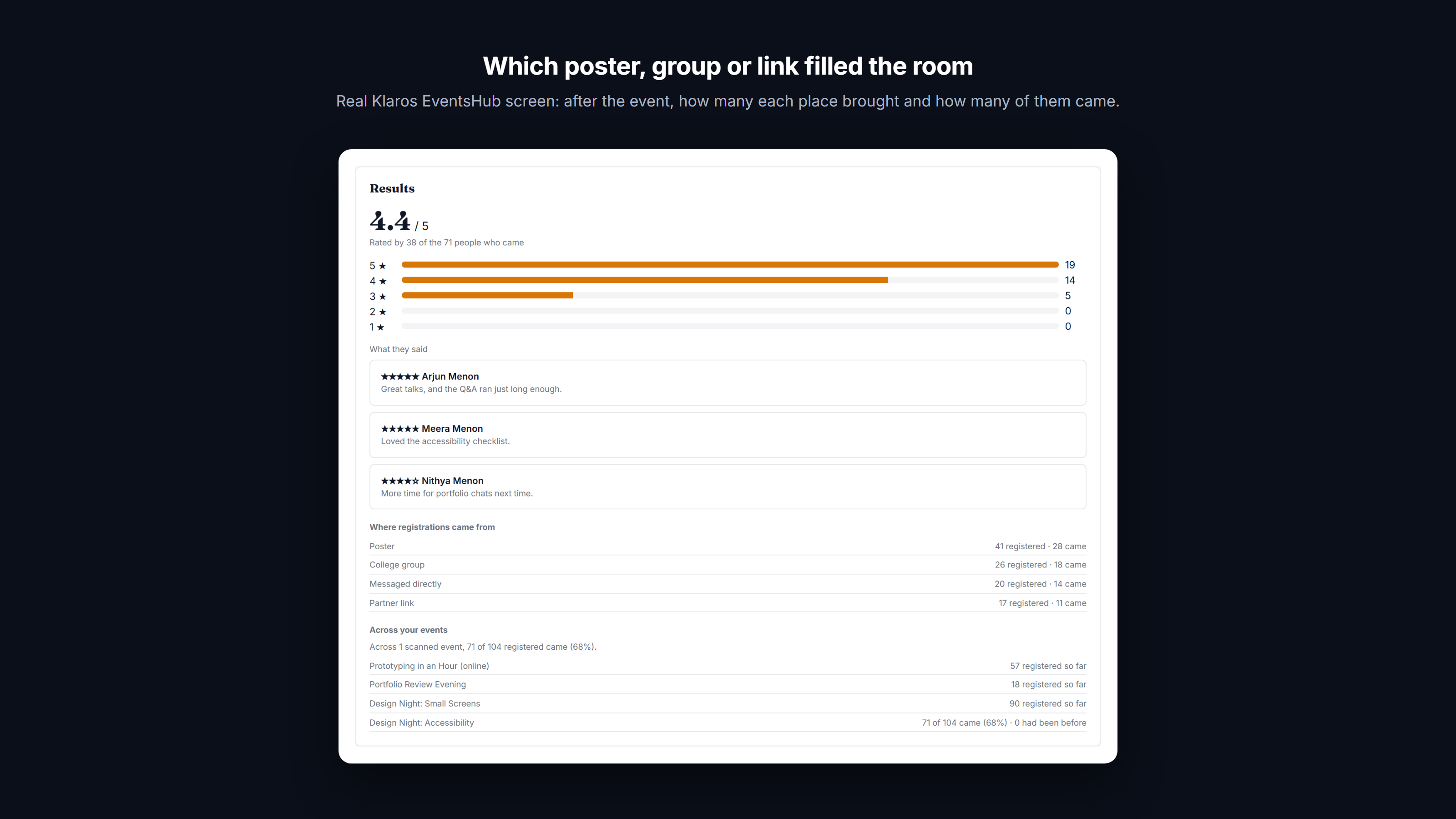
After the event: for each source, how many registered and how many came, with the rating people gave it.
Messages written in a hurry, in one language, for a room that reads two.
The Problem
Reminders get typed the night before, differently every time, and always in the organiser's language. Attendees who read Spanish get English, and nobody checks what the waiting-list or approval message actually says until someone complains.
The Klaros Way
Every message an event sends is shown in the words attendees will read, in the order they receive them, and the reminders and the messages after the event can each be switched off for that event; the pass and the waiting-list replies always go. The language is set per event, English or Spanish. Replies in the chat follow it straight away; the WhatsApp templates switch to Spanish once Meta approves the Spanish wording on your number, and until then go in English, as the preview says.
Technical Differentiator: The preview is built from the same code that sends, so it cannot drift from what goes out; a template language is chosen from what Meta has approved on your number, never translated at send time.
Expected Impact: What attendees receive is decided once, read in advance, and in their language.
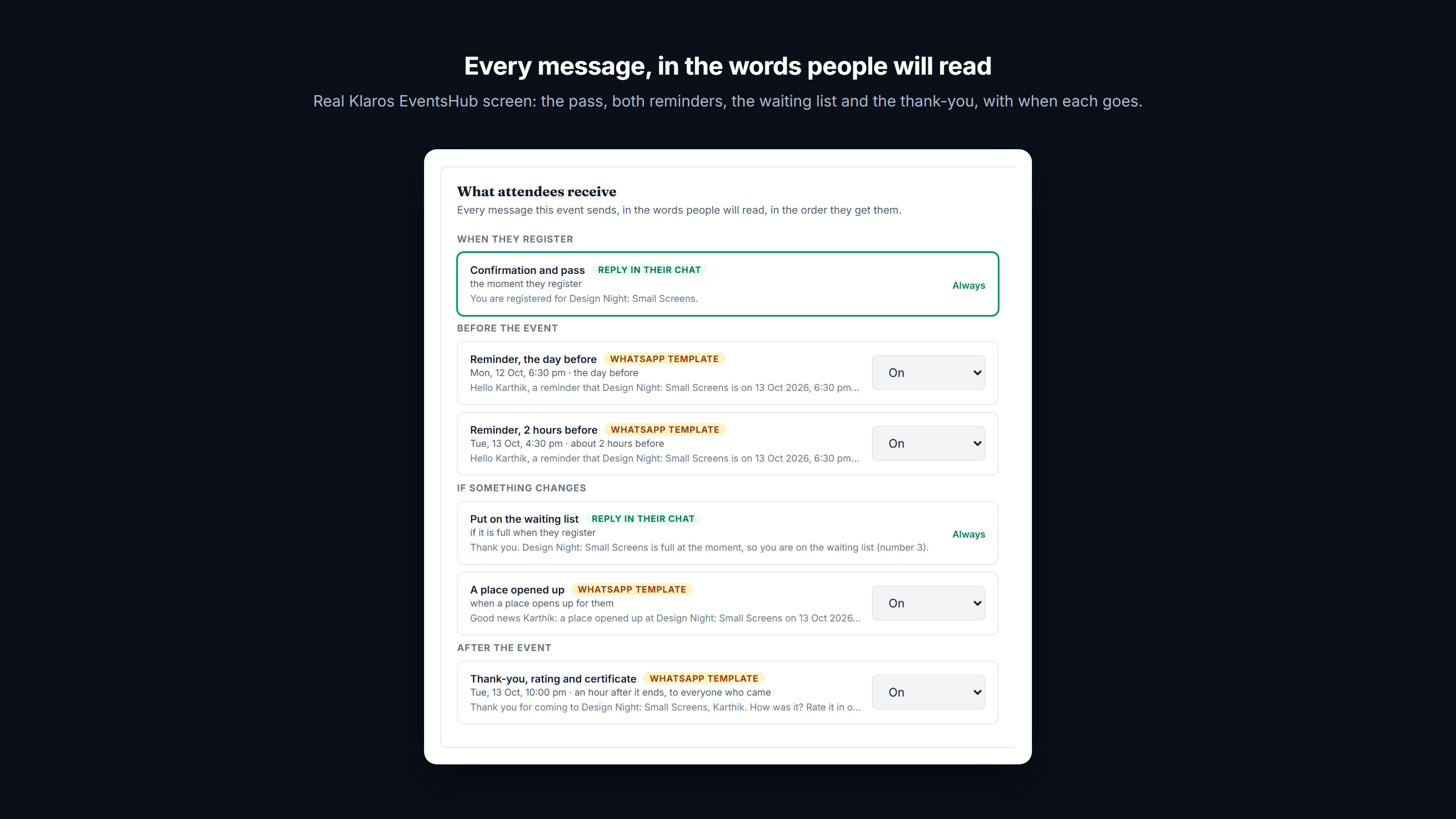
The pass, both reminders, the waiting list and the thank-you, in the words attendees read, with when each goes.
A door that depends on signal, a printed list and one person who knows it.
The Problem
At the entrance, a volunteer scrolls a spreadsheet on a phone with one bar of signal while the queue grows. Names are misspelt, the list is out of date, and afterwards nobody knows who actually came.
The Klaros Way
Organisers share a scanner link with each volunteer. It opens on any phone, carries the guest list, checks passes with no signal and flags a pass used twice, and sends the arrivals when the signal returns. The Door tab shows arrivals as they happen and how many registered people have not come yet; anyone without a pass is admitted by their number.
Technical Differentiator: Signed passes are checked on the phone itself against a guest list it downloaded, and scans wait on the phone until they can be sent. A lost phone's scanner links are withdrawn in one step.
Expected Impact: A quicker door, and an attendance figure you can stand behind.
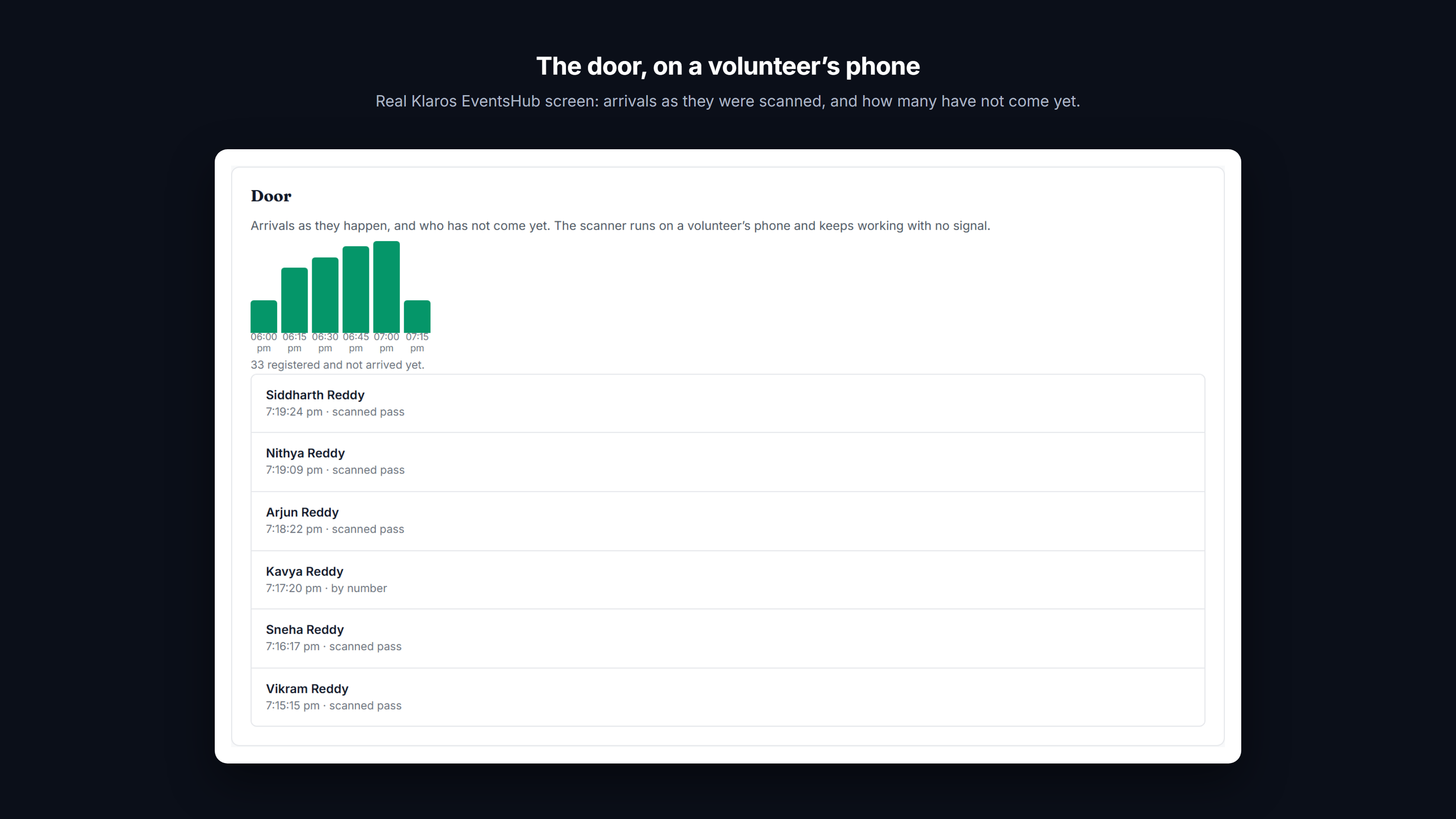
Arrivals as they were scanned, by pass or by number, and how many registered people have not arrived.
The run-sheet lives in one organiser's head.
The Problem
Who brings the projector, who collects the slides, who prints the badges: it sits in a chat thread and the organiser's memory, and the day before, three things are not done.
The Klaros Way
Each event has its crew: co-organisers, speakers, sponsors and volunteers. Speakers and sponsors can appear on the event page, each with an invite link that counts who they brought. Tasks have an owner and a date; the owner is reminded on WhatsApp an hour before and replies DONE to close it.
Technical Differentiator: Tasks are reminders owed to a named person, in the event's own time zone, closed by a reply rather than a login.
Expected Impact: The team knows what is left, without the organiser chasing each person.
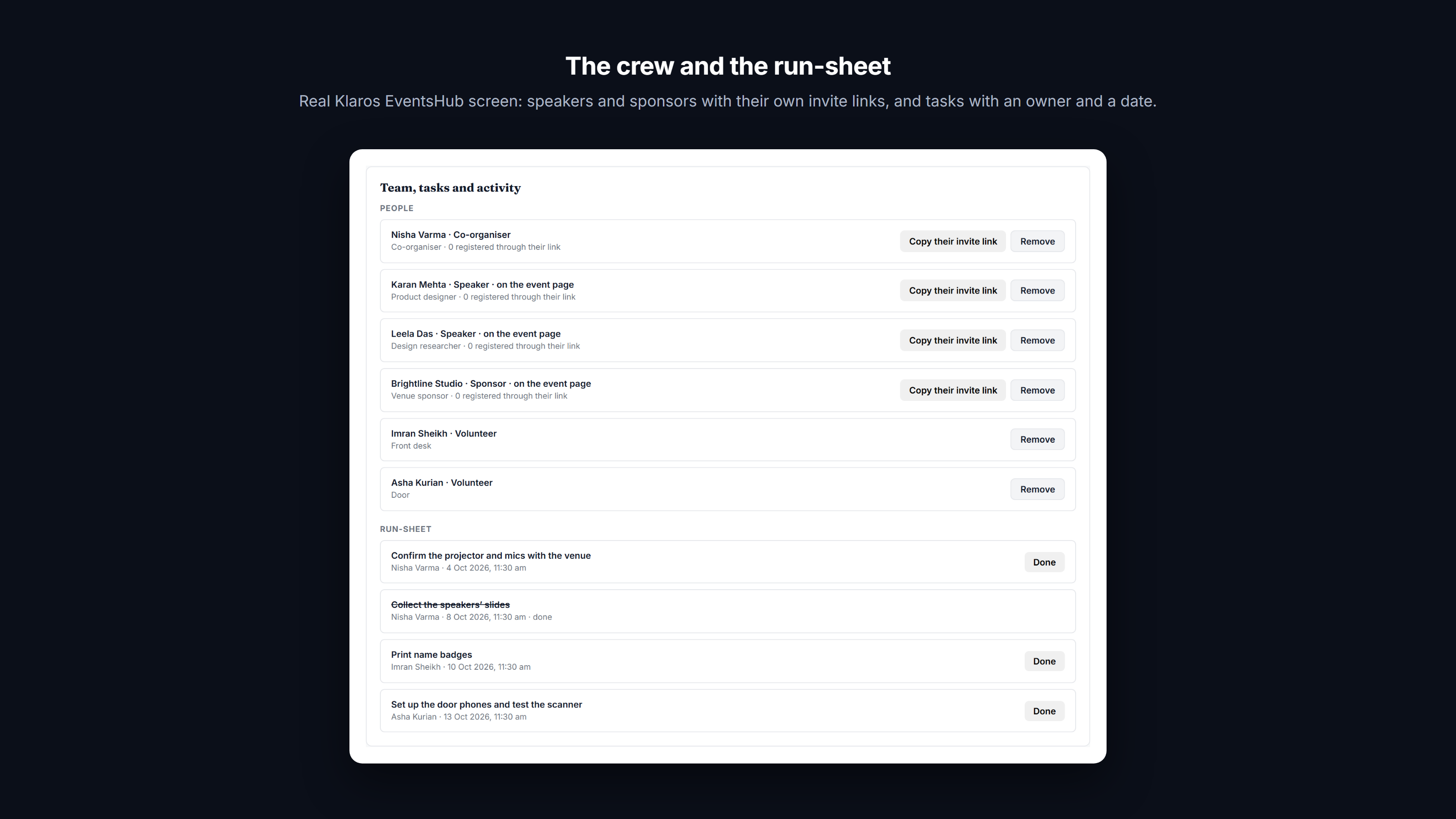
Speakers and sponsors with their own invite links, and tasks with an owner and a date.
How it works
- Create: name the event, when and where it happens (in person, online or both), its capacity and the language attendees read. Klaros gives it a registration code and a public event page.
- Promote: print the poster, a tracked QR code, or share the link in groups and with partners. Each way in carries its source, and speakers, sponsors and attendees get their own invite links.
- Register: the tap opens WhatsApp with the message already written, and a short form follows in the chat. The pass arrives in the same thread; a full event offers the waiting list, and an approval-only event takes an application.
- Remind: the day before and two hours before, with the pass, worded for in person or online, and in the attendee's language once Meta has approved that wording. A place that frees up goes to the next person waiting, with their pass.
- Admit: each volunteer opens a scanner link on their own phone. It carries the guest list, checks passes with no signal, flags a pass used twice, and sends arrivals as soon as the signal is back. Anyone without a pass is admitted by their number.
- Follow up: an hour after the end, everyone who came gets a thank-you with a one-tap rating and a certificate. People who registered, did not come and agreed to hear from you get what they missed.
Boundaries and prerequisites
Requires
- Your WhatsApp Business number connected to Klaros on the Cloud API
- Meta's approval of the event message templates on your number; Klaros submits them for you
Works with
- Printed posters and flyers, as tracked QR codes from Pages & QR
- Paid tickets through the Commerce extension (your own Razorpay account, in Indian rupees)
- The Klaros API, and AI assistants over MCP
Does not replace
- A ticket marketplace where strangers discover your event
- Turnstiles or access-control hardware at a venue
- The platform you stream an online event on
When not to use it
- If your attendees do not use WhatsApp.
- For reserved seating with a seat map, which EventsHub does not draw.
Frequently Asked Questions
Do attendees need to install anything?
No. Registration, the pass, the reminders and the thank-you all arrive in the attendee's own WhatsApp. The pass opens as a page from the message, and the event page opens in any browser.
What happens when the event is full?
Registration carries on into a waiting list, in order. When someone says they cannot come, or you raise the capacity, the next person waiting gets the place and their pass on WhatsApp automatically. An event can also be approval-only, and everyone who applies hears back either way.
Does the door scanner need internet?
Only to open it and to send the arrivals back. Once it is open, it checks passes on the phone with no signal, shows when a pass has already been used, and sends the scans as soon as the signal returns.
Which languages can attendees read?
English or Spanish, chosen per event. Replies in the chat switch straight away. The WhatsApp templates (the reminders, the pass and the thank-you) switch once Meta approves the Spanish wording, which Klaros submits when you choose Spanish; until then they go in English.
Can I charge for tickets?
Yes, with the Commerce extension: ticket types and promo codes, paid in the chat through your own Razorpay account, in Indian rupees. The pass follows the payment. Free events need nothing extra.
How do I know which promotion worked?
Every way in carries a source: the poster's tracked QR code, a link per group or partner, and each speaker's and attendee's invite link. After the event, each source shows how many registered and how many were scanned in at the door.
Can I run events from the API or an AI assistant?
Yes. Events, the crew, passes and scanner links are in the Klaros API, and the Klaros MCP server lets an AI assistant create and manage them.
Do you take a markup on the WhatsApp infrastructure cost for this extension?
No. Klaros never sits in the payment or messaging path. You connect your own WhatsApp Business Account (WABA) and pay Meta directly. "Zero markup" is a structural guarantee.
Can I trial this extension before committing?
Every workspace starts with a 14-day free trial of the core CRM, and can see every extension and what it does. Switching an extension on is part of a paid plan: message us on WhatsApp and we will turn it on for you.
Where is my conversation data stored?
All data lives in your own isolated Cloudflare D1 database and R2 buckets. Klaros is self-deployed infrastructure, giving you total data sovereignty and zero vendor lock-in.