Build notes · reliability
The WhatsApp follow-ups we tested like a shop owner
Live in production since 30 September 2026
“I’ll send you the designs on Friday.” “Let me check the batch dates and come back to you.” A business on WhatsApp makes small promises like these all day, and they are the ones that get lost, because they live in one person’s head. The customer remembers. Klaros now does too.
Follow-ups are live in the Klaros inbox. Before they shipped, we used them the way a shop owner would, recorded every step, and checked every answer against the real server. The recording caught two faults that 10,344 unit tests had passed. This note is that test, scene by scene.
TL;DR
What is new: when anyone at your business promises a customer something in a WhatsApp chat, Klaros keeps it, due at the right time, for whoever owes it, until it is done. When Klaros cannot send a follow-up itself, it hands it to a person and says why.
How we tested it: six scenes, each a job a person at the business does, each with its reason written first, recorded on the release build. 33 of 33 checks read the result back from the real server and database.
What the test caught: a query Cloudflare D1 refuses, which would have broken the Follow-ups list for every business, and the customer’s name pushed out of the chat header on phones and laptops. Both were fixed before release, and both are now checks.
Watch the test
What you get
- It hears a promiseWrite “I’ll send the photos tomorrow” and Klaros asks, once, whether to remember it. A message that only states a time gets no question. See the test
- Follow up in five secondsFor promises made on a call: what you promised, when, and whether it is yours or anyone’s on the team. See the test
- Your morning listEverything owed today, overdue first, with Done, Tomorrow or Drop, without leaving the inbox. See the test
- It never fails quietlyWhen Klaros cannot send a follow-up itself, it hands it to a person and says why. See the test
- Your language, your phoneIn English and Spanish, and laid out for the phone most businesses answer from. See the test
Follow-ups are part of the core Klaros WhatsApp CRM inbox, for a jeweller, a course or a skincare brand alike. The sample people in this test cover all three: Meena asking a jeweller for bridal-set photos, Arjun and Karthik asking a course about batches and fees, Priya and Neha buying from a skincare brand, and Farah waiting for a fitting.
How we test like a user
A scene is one job a person at the business does. Before any check is written, the scene states why it exists: what would go wrong for a real business if it failed. Then a browser does the job at human speed while it is recorded, and every check asks the server what actually happened.
Sample
- The conversations: invented people and messages.
- Every phone number masked, on every frame.
Real
- Every follow-up: the API, the database, the agent’s own key.
- The scheduled engine run, fired the way production fires it.
The test refuses to start on a machine with a WhatsApp number configured, so no scene can message a real person; delivery itself has its own tests. After every run we watch the recording, and that step found more than the checks did. Each check below shows what the server returned, as it returned it. Times there are in UTC: 04:30 UTC is 10:00 in India, where the test ran.
The six scenes
Captures Scene 1 of 6 8 of 8 checks pass
A promise typed in the chat is offered back, once
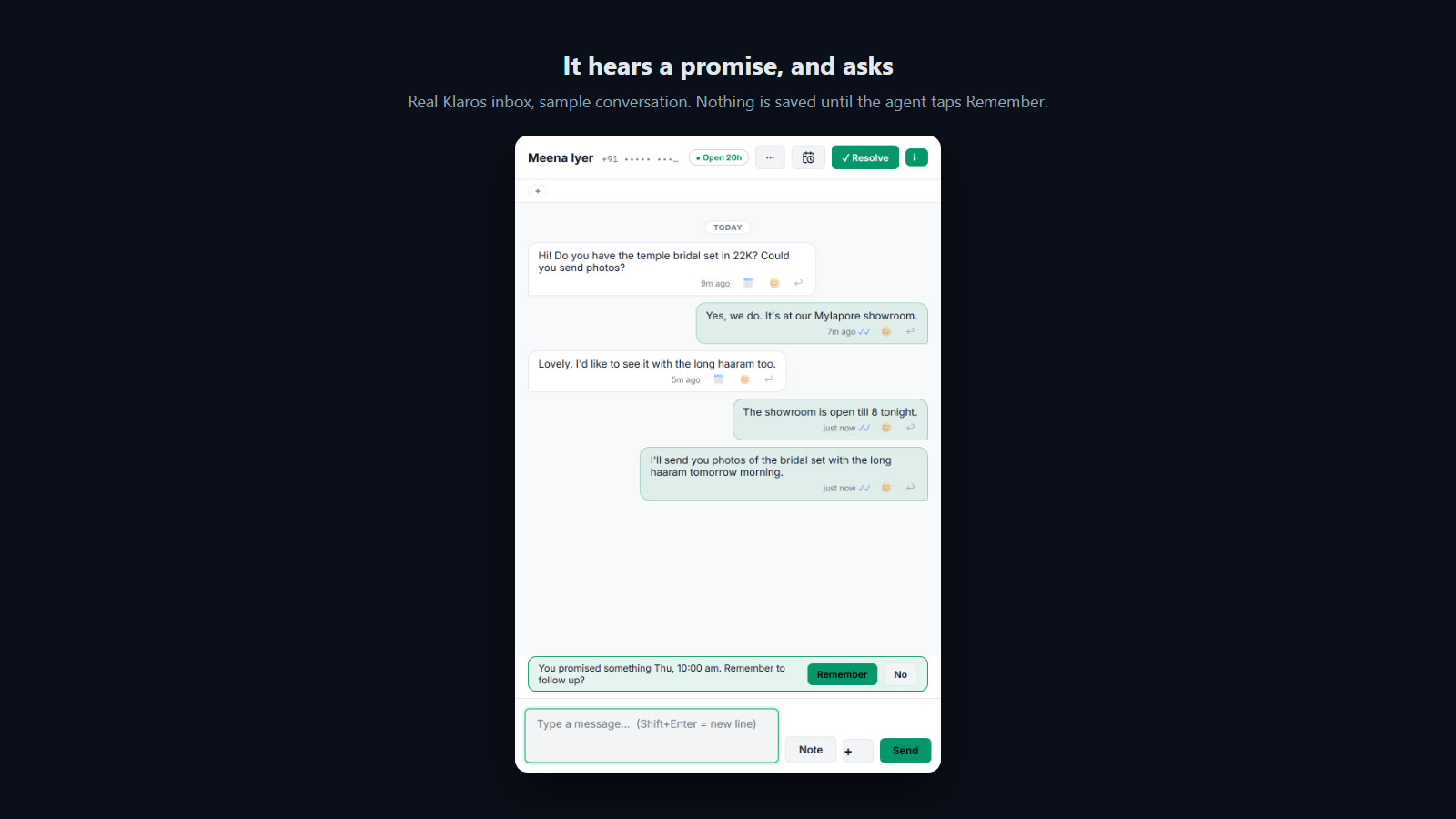
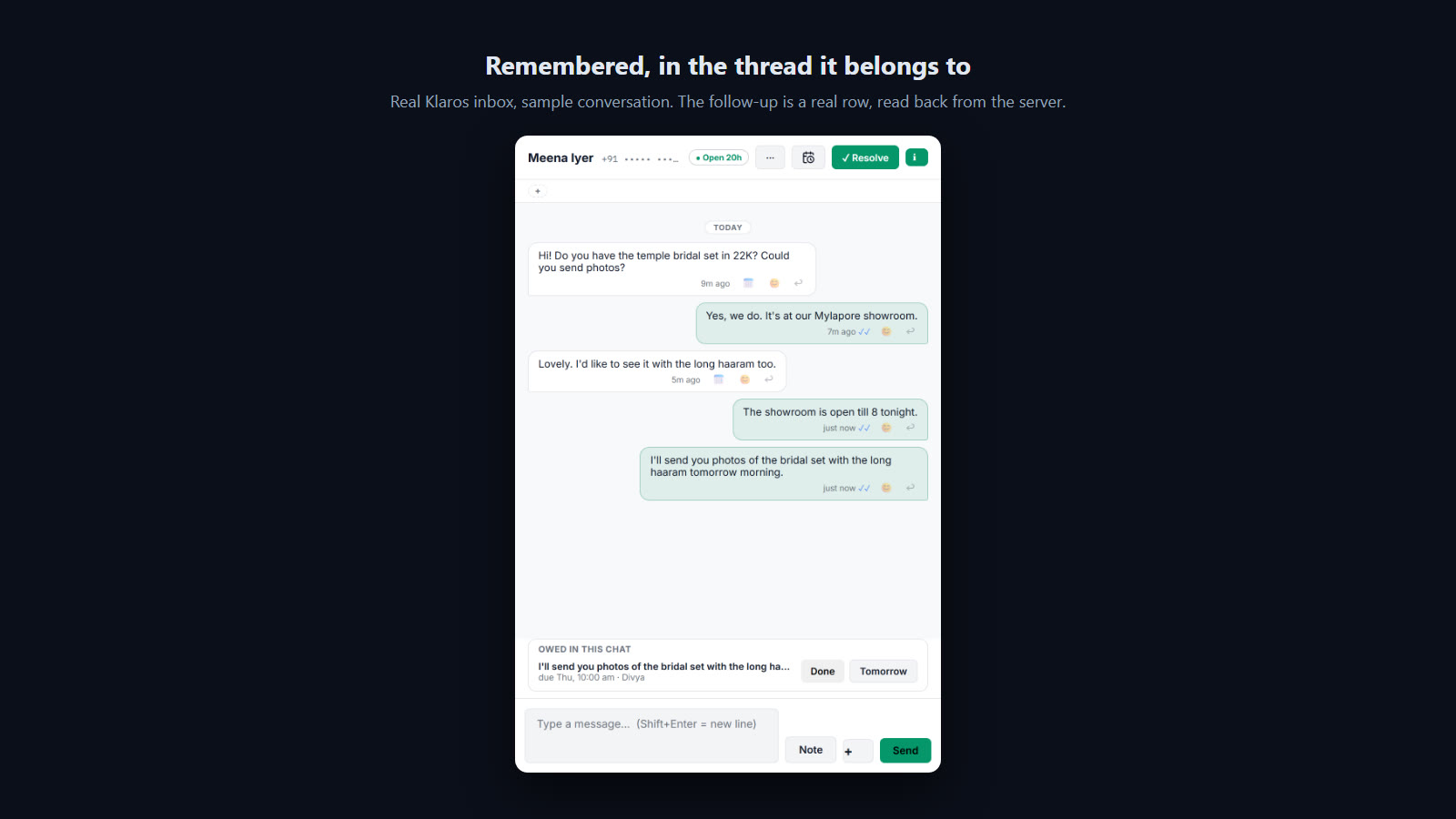
Why this test exists. Most follow-ups are lost at the moment they are made: the agent types "I'll send it tomorrow" and nothing in the software hears it. The chip is the cheapest possible capture, and it must never invent a promise, so the test sends a harmless message first and expects silence.
What the user does
- Open Meena Iyer (jewellery, asking for photos of a bridal set).
- Send "The showroom is open till 8 tonight." (a time, but not a promise).
- Send "I'll send you photos of the bridal set with the long haaram tomorrow morning."
- Tap Remember on the chip.
- PASS The contact's name is shown in full beside the Follow up button
{"text":"Meena Iyer","clipped":false} - PASS No chip for a message that states a time but promises nothing
- PASS The chip appears after a message that promised something
You promised something Thu, 10:00 am. Remember to follow up? ⏎ Remember ⏎ No - PASS Nothing is saved before the agent taps
0 - PASS One follow-up exists in the database, in the agent's own words, owed by her
[{"note":"I'll send you photos of the bridal set with the long haaram tomorrow morning.","debtor":"Divya","due":"2026-10-01T04:30:00.000Z"}] - PASS It is due tomorrow at 10:00, local time
2026-10-01T04:30:00.000Z - PASS The thread shows what is owed to Meena
- PASS No uncaught errors on the page
Captures Scene 2 of 6 4 of 4 checks pass
Follow up by hand, for whoever on the team picks it up
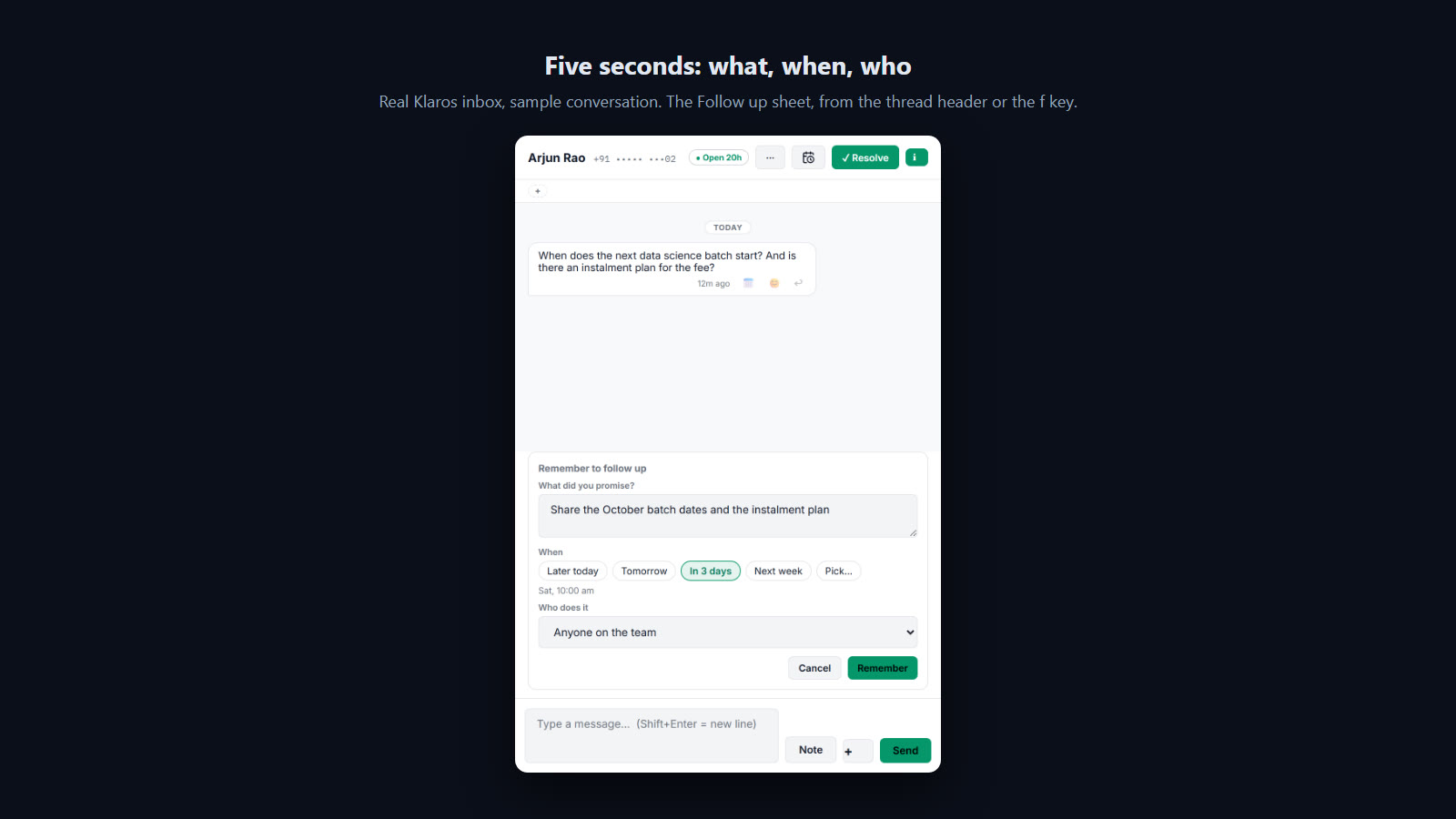
Why this test exists. Not every promise is typed in a sentence the chip can read: "let me check" often happens on a call. The button has to take five seconds, refuse an empty promise, and let the agent leave it for anyone on the team.
What the user does
- Open Arjun Rao (a learner asking about batch dates and fees).
- Tap Follow up, then Remember with nothing written.
- Write the promise, pick In 3 days, choose Anyone on the team, Remember.
- PASS An empty promise is refused and the sheet stays open
- PASS Saved for anyone on the team (no agent named)
[{"note":"Share the October batch dates and the instalment plan","agent":null}] - PASS Due in three days at 10:00
2026-10-03T04:30:00.000Z - PASS No uncaught errors on the page
Shows Scene 3 of 6 6 of 6 checks pass
The morning: who do I owe today?
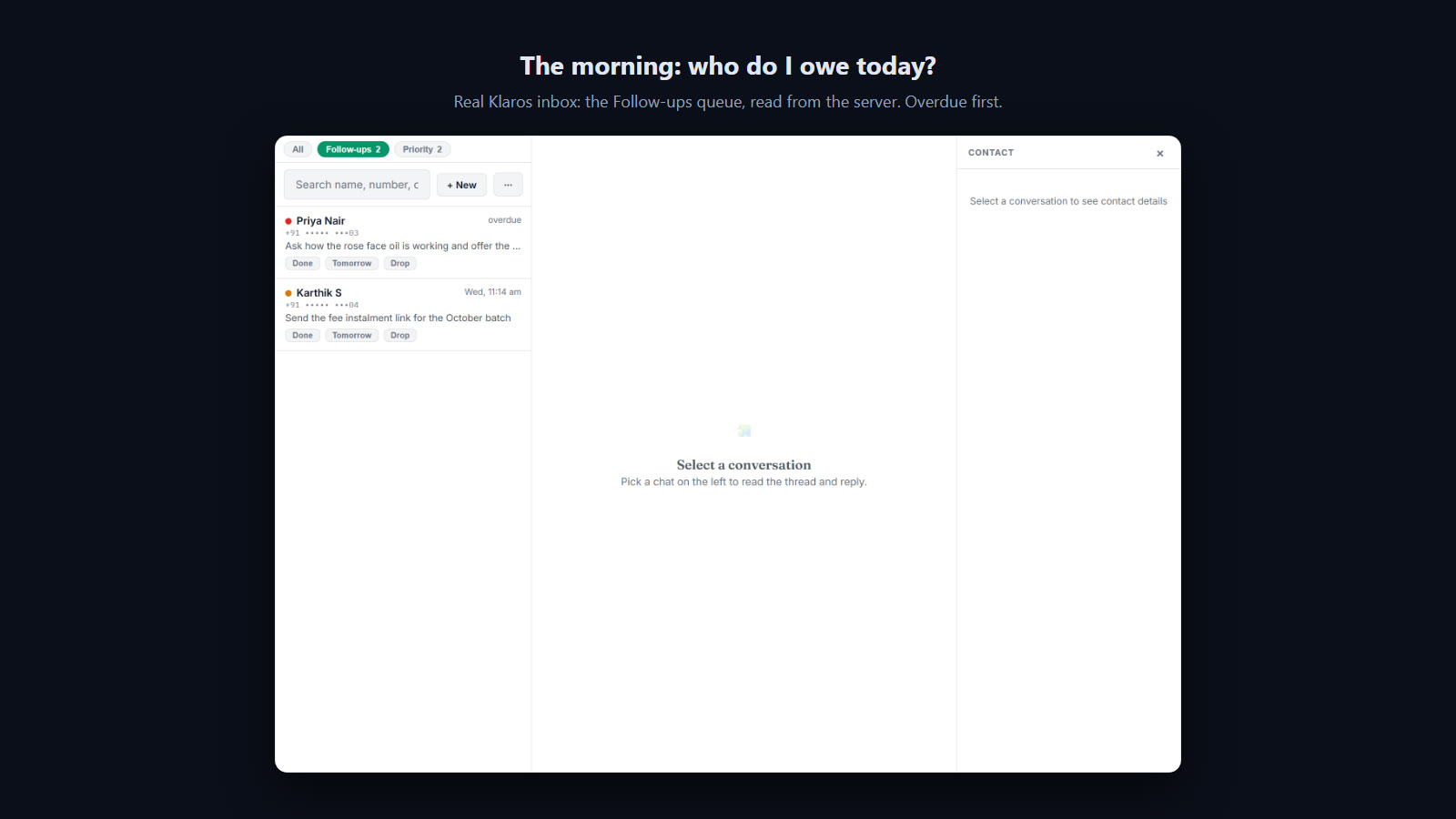
Why this test exists. Remembering is worthless if nobody looks. The Follow-ups chip sits beside the other attention queues in the inbox, overdue first, and every row has the three verbs a person needs: done, tomorrow, drop. The test checks that the count matches the server, the order is overdue first, and that Done and Tomorrow change the real rows.
What the user does
- Open the inbox, tap the Follow-ups chip.
- Open Karthik from the list; tap Done on his row.
- Tap Tomorrow on Priya's overdue row.
- PASS The chip count is what the server says is due today
{"chip":2,"server":2} - PASS Overdue comes first
Priya Nair | overdue | +91 ••••• •••03 - PASS Done closes the real row
done - PASS Tomorrow moves it to tomorrow at 10:00 and off today's list
2026-10-01T04:30:00.000Z - PASS The count goes down with each
{"before":2,"after":0} - PASS No uncaught errors on the page
Follows up Scene 4 of 6 6 of 6 checks pass
When Klaros cannot send it, somebody is told
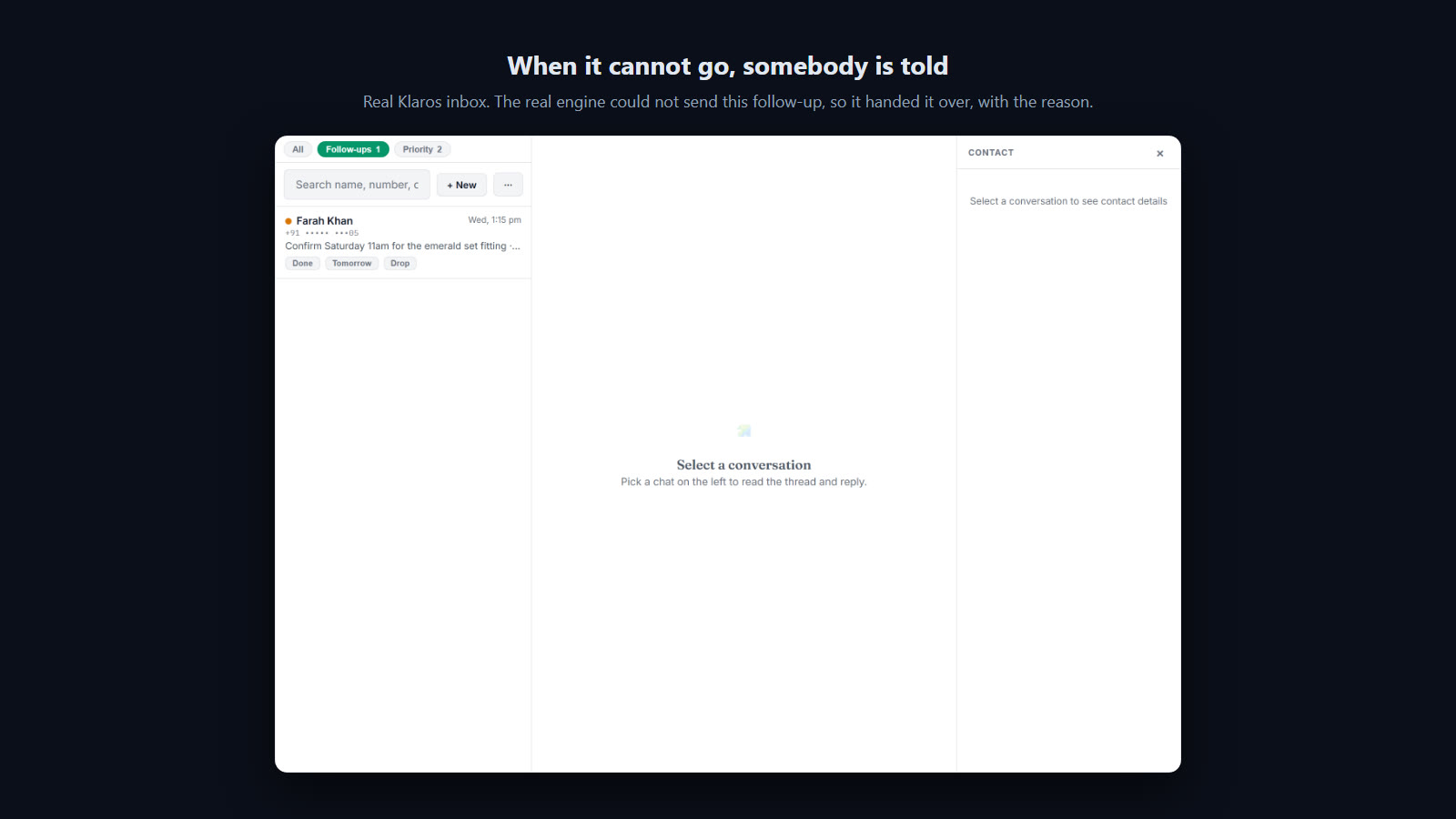
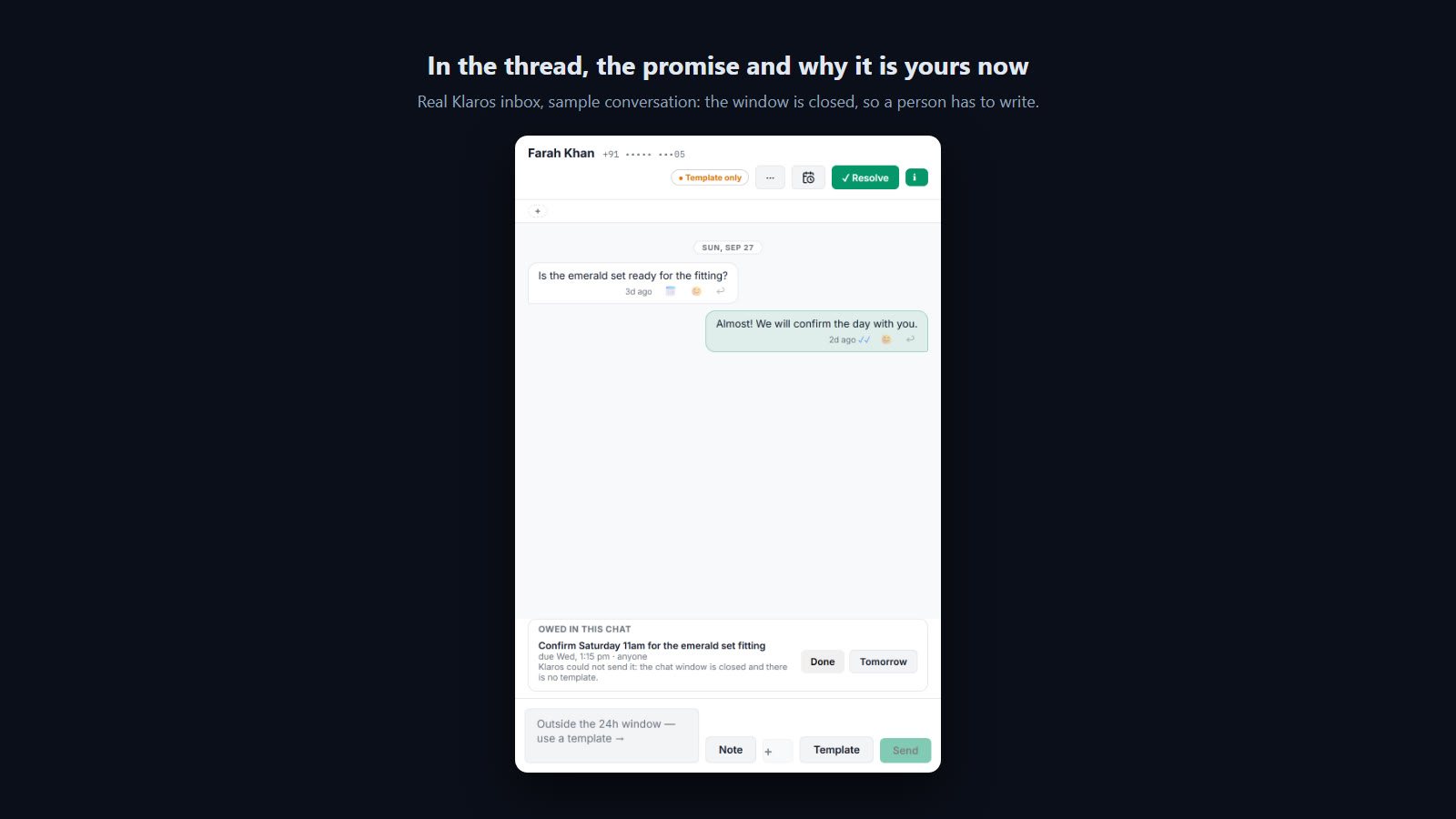
Why this test exists. The worst failure in software like this is the silent one: the message did not go, and the screen says nothing. A follow-up Klaros was asked to send to Farah falls outside the 24-hour window with no approved template, so WhatsApp would refuse it. The engine must hand it to a person, with the reason, instead of dropping it. A sibling promise to Neha, whose window is open, must go out as a normal message.
What the user does
- Through the API, ask Klaros to send Farah and Neha a follow-up, due a minute ago.
- Fire the worker's own 15-minute scheduled tick, the path production runs.
- Open the Follow-ups queue and Farah's thread.
- PASS Both were accepted by the API
[201,201] - PASS The scheduled tick ran
200 - PASS Farah: not sent (WhatsApp would refuse it), handed to a person with the reason
{"state":"open","debtor":"person","actions":["created:klaros_sends","handed_to_person:undeliverable:no_template"]} - PASS Neha (window open): queued as a normal message, not a template
{"state":"done","actions":["created:klaros_sends","sent:via freeform"]} - PASS The queue says why, in words
Farah Khan | Wed, 1:15 pm | +91 ••••• •••05 - PASS No uncaught errors on the page
Captures Scene 5 of 6 3 of 3 checks pass
The same promise, in Spanish
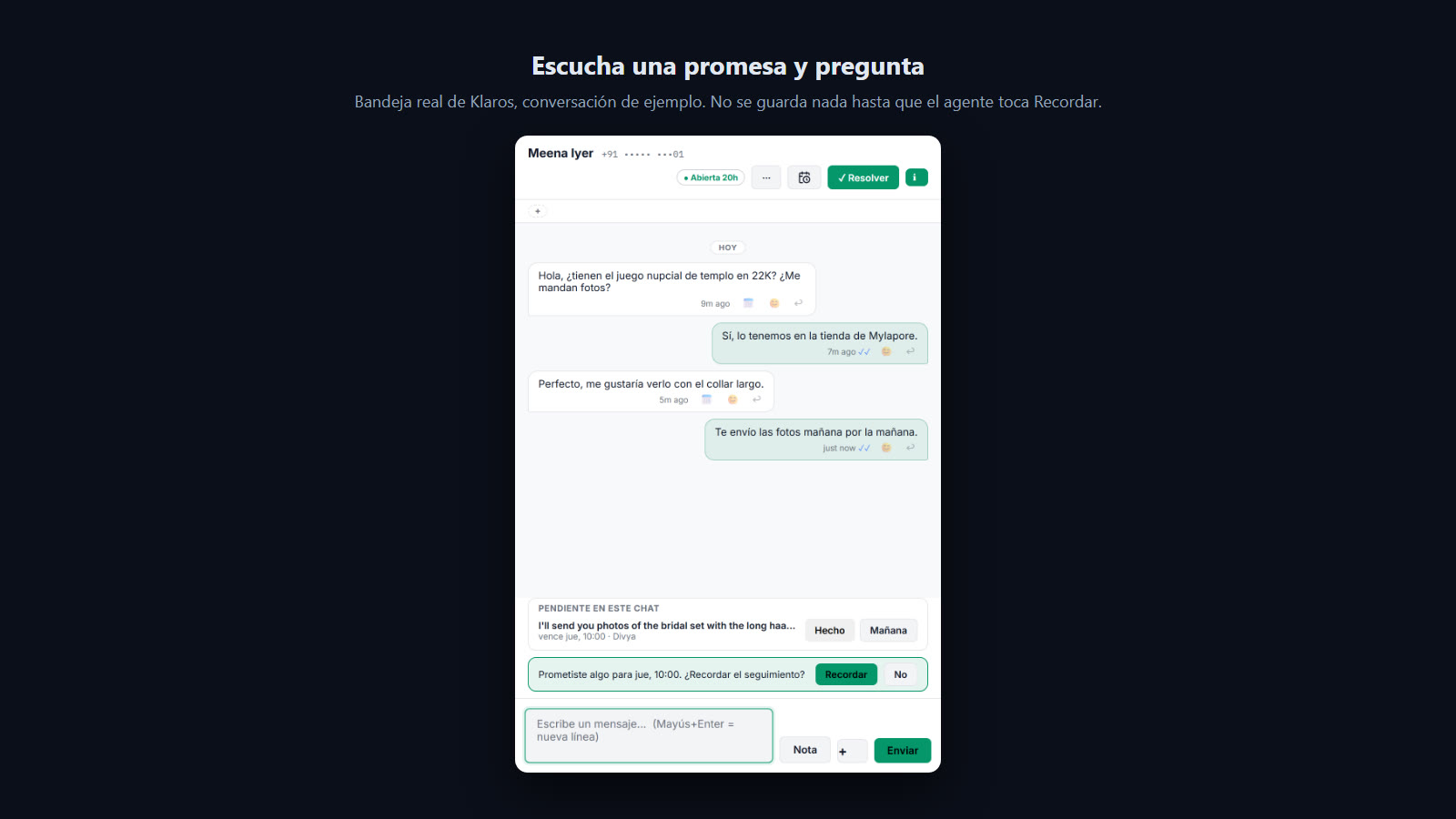
Why this test exists. Klaros serves businesses outside India too, and a Spanish-speaking agent promises things in Spanish. The chip has to hear "te envío las fotos mañana" and the whole surface has to speak the agent's language.
What the user does
- Dashboard in Spanish; open Meena's thread (in Spanish).
- Send "Te envío las fotos mañana por la mañana."
- PASS The chip hears a Spanish promise and asks in Spanish
Prometiste algo para jue, 10:00. ¿Recordar el seguimiento? ⏎ Recordar ⏎ No - PASS The thread strip is in Spanish
- PASS No uncaught errors on the page
Shows Scene 6 of 6 6 of 6 checks pass
On a phone, where most of this happens
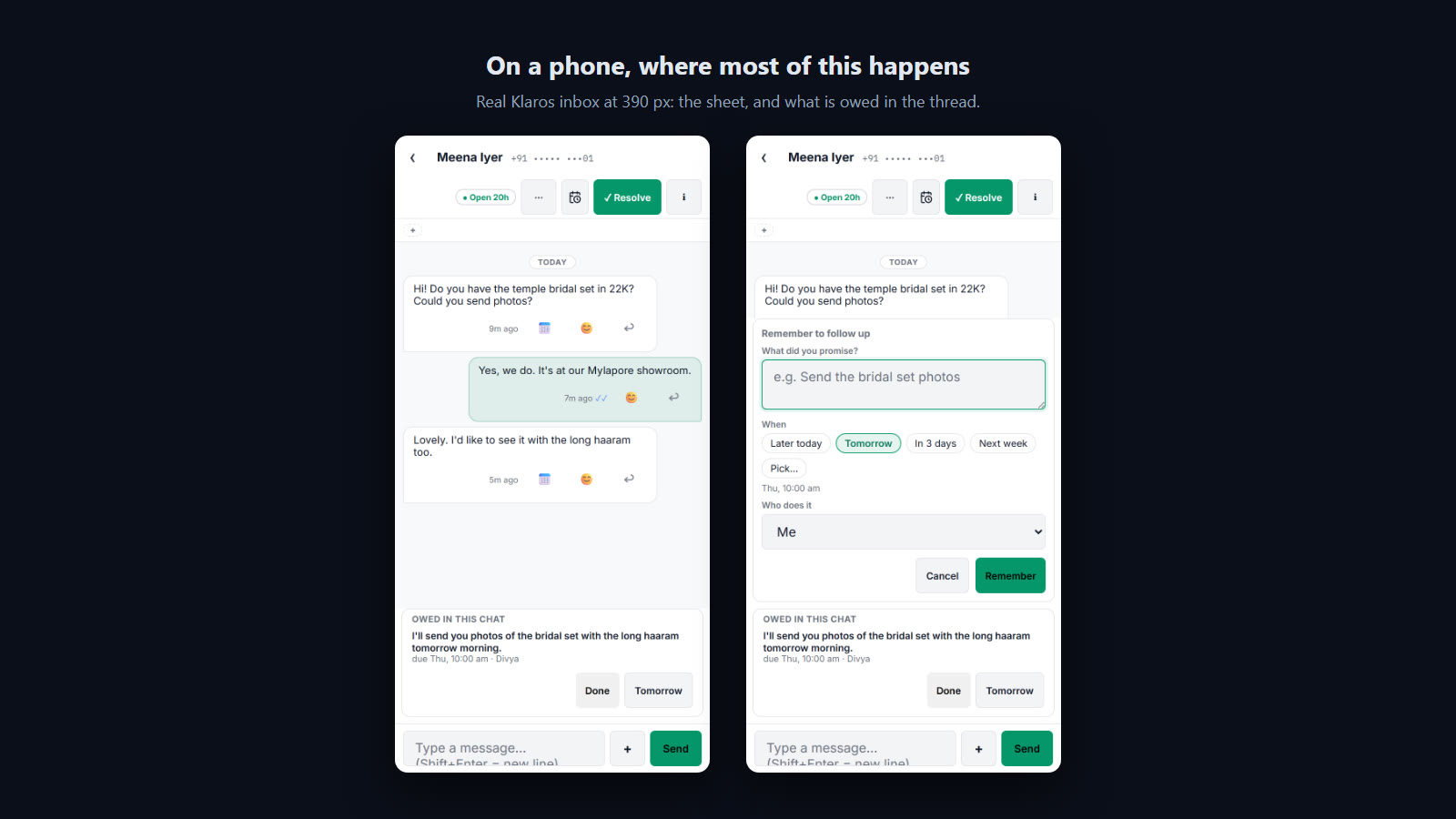
Why this test exists. Shop owners answer WhatsApp customers from their phones. A follow-up surface that only works at desk width is not one they will use. The test checks the page does not scroll sideways and the sheet fits the screen.
What the user does
- Open Meena's thread at 390 px wide.
- Tap Follow up.
- PASS No sideways scroll at 390 px
{"scrollW":390,"innerW":390,"popLeft":8,"popRight":382} - PASS The sheet fits the screen
{"scrollW":390,"innerW":390,"popLeft":8,"popRight":382} - PASS The contact's name is visible in the header
{"nameWidth":82,"rightmost":380,"innerW":390} - PASS Every header button is on screen
{"nameWidth":82,"rightmost":380,"innerW":390} - PASS The contact's name is shown in full at 1024, 1280, 1440 and 1600 px
{"1024":true,"1280":true,"1440":true,"1600":true} - PASS No uncaught errors on the page
Two faults caught before release
A query the real database refuses
The Follow-ups list names each person with a small lookup inside its query. Against a local copy of Cloudflare’s database, the first call came back with:
D1_ERROR: no such column: o.contact_id at offset 202: SQLITE_ERROR
The lookup referred to the outer row inside its own ORDER BY. Our unit tests run the
same query on a newer version of SQLite, which accepts that shape, so every one of them passed. In
production the list and the “owed in this chat” strip would have failed for every business. We
replaced the clever lookup with two plain ones and confirmed the new query on the production
database before release. The lesson is older than this feature: test against the thing that ships.
The name that disappeared
The first recorded run passed 28 of 29 checks, including “no sideways scroll on a phone”. The recording showed the rest: the new Follow up button had pushed the customer’s name out of the chat header. On a 1280-pixel laptop with the contact panel open, the header is 370 pixels wide, the buttons need about 300, and the name got none.
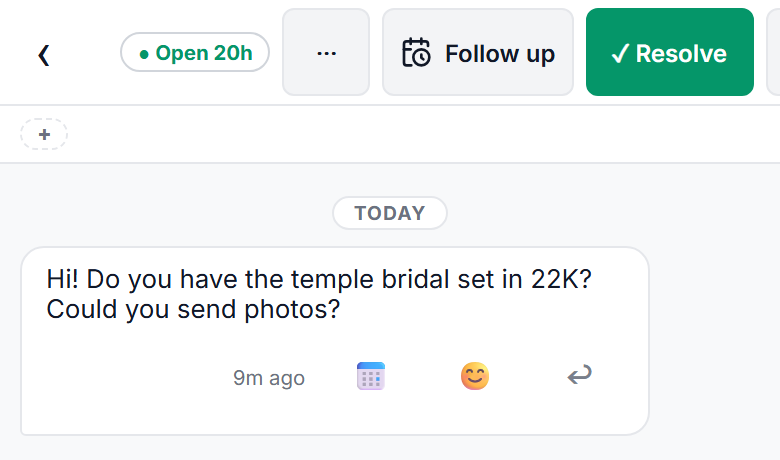
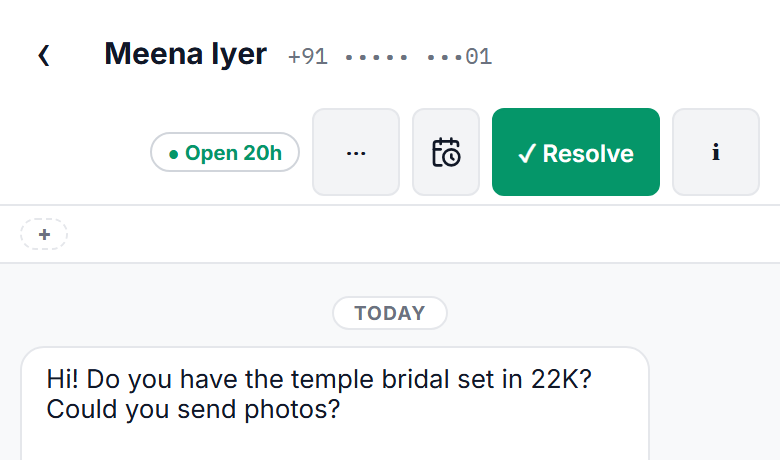
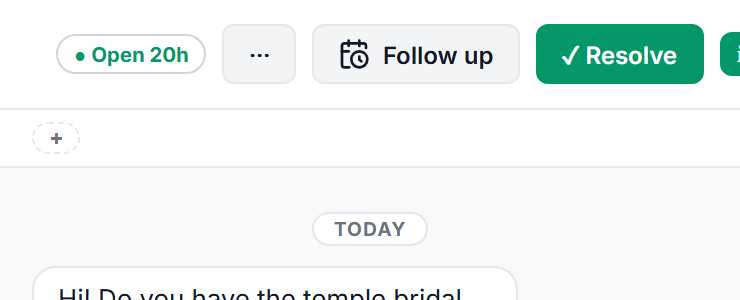
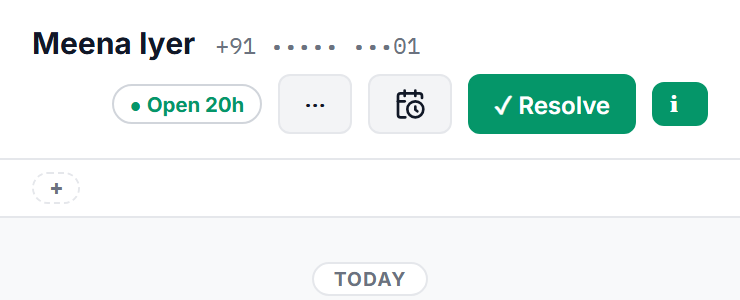
The “before” images are the release build with the fix switched off in the browser, so each pair differs by that fix alone. The name and number now always get room, and the buttons move to a second line when they must. The Follow up button shows its label where there is space and an icon where there is not. A check now measures the name at 1024, 1280, 1440 and 1600 pixels.
What comes next
- A nudge on your own phone when a follow-up is handed to you, outside the dashboard.
- Customers asking “remind me” in the chat, and Klaros keeping it.
- Dates that matter: a wedding anniversary, a course’s next intake, a reorder that is due.
Questions people ask about WhatsApp follow-ups in Klaros
What is a follow-up in the Klaros inbox?
Something someone at the business promised one customer in a WhatsApp chat, with a time: “I’ll send the photos tomorrow”, “let me check the batch dates”. Klaros keeps it on a Follow-ups list, due at that time, owed by the agent who made it or by anyone on the team, until somebody marks it done, moves it to tomorrow or drops it.
Does Klaros create follow-ups by itself?
No. After an agent sends a message that promises something at a time, the inbox offers one question: remember to follow up? Nothing is saved unless the agent taps Remember. A message that only states a time, such as “the showroom is open till 8 tonight”, gets no question at all. Agents can also add a follow-up by hand from the Follow up button in the chat header, or with the f key.
What happens when Klaros cannot send a follow-up it was asked to send?
It hands the follow-up to a person instead of dropping it, and says why: the 24-hour chat window is closed and there is no approved template, the customer has opted out, automatic sending is turned off, or WhatsApp refused the message after it was queued. The follow-up then sits on the Follow-ups list like any promise an agent made.
Where do I see what I owe customers today?
In the inbox, on the Follow-ups chip beside Priority. It lists what is due by the end of your day, overdue first, each with Done, Tomorrow and Drop. Inside a chat, a strip above the composer shows everything owed to that one person.
Do follow-ups work in Spanish and on a phone?
Yes. The inbox, the follow-up sheet and the promise question are in English and Spanish, and the question understands promises written in either (“I’ll send it tomorrow”, “te envío las fotos mañana”). On a phone the chat header keeps the customer’s name on its own line and the sheet fits the screen.
How was this feature tested before release?
As a recorded user test: six scenes, each something a person at a business actually does, with its reason written first. A browser performed each one at human speed on the release build while it was screen-recorded, and 33 checks read the results back from the real server and database. The conversations were sample data with every number masked; the follow-ups, the API and the scheduled engine run were real.
What did the recorded test catch that unit tests missed?
Two faults. A database query used an outer column inside a correlated subquery’s ORDER BY, which Cloudflare D1 rejects with no such column while the newer SQLite under the unit tests accepts it; the Follow-ups list would have failed in production. And the chat header pushed the customer’s name out of view on a phone and on a 1280-pixel laptop with the contact panel open. Both were fixed and both are now checks.
Are follow-ups an extra-cost add-on?
No. Follow-ups are part of the core Klaros inbox, and they are included in the 14-day trial of the core CRM.
Try follow-ups in your own inbox
Follow-ups are part of the core Klaros inbox, so they come with the 14-day trial of the core CRM. Klaros runs in your own Cloudflare account, on your own WhatsApp number.
+91 97893 77634 · you message first, so nothing reaches you without your say-so.
Written 2 October 2026, after follow-ups went live on 30 September. We append when the facts change. Related: the enrichment failure nothing reported, the WhatsApp catalogue that tells the truth, the day there is no free way to answer a WhatsApp customer, what self-deployed actually means, all build notes.